
DevOps Case Study: Treating My Portfolio Like Production
How a DevOps engineer builds a portfolio. Explore the architecture, DNS routing, and Prometheus observability stack behind a Next.js site.
The "It's Just a Portfolio" Trap
When you tell people you are building a personal portfolio, the usual advice is to spin up a basic HTML page, throw it on GitHub Pages, and call it a day.
But if you are a DevOps or Platform Engineer, your portfolio is your resume. How you build, deploy, and monitor it tells a hiring manager more about your engineering standards than a bullet point on a PDF ever could.
For moarkid.com, I decided to treat this "little" project like a Tier-1 production service. No AI fluff, no theoretical architectures—just real decisions, real DNS records, and real observability.
Here is the exact infrastructure stack powering this site.
Architecture Overview
At a high level, this is a Next.js 16 (App Router) application. But the application code is only 20% of the equation. The other 80% is how it gets delivered to your browser securely and fast.
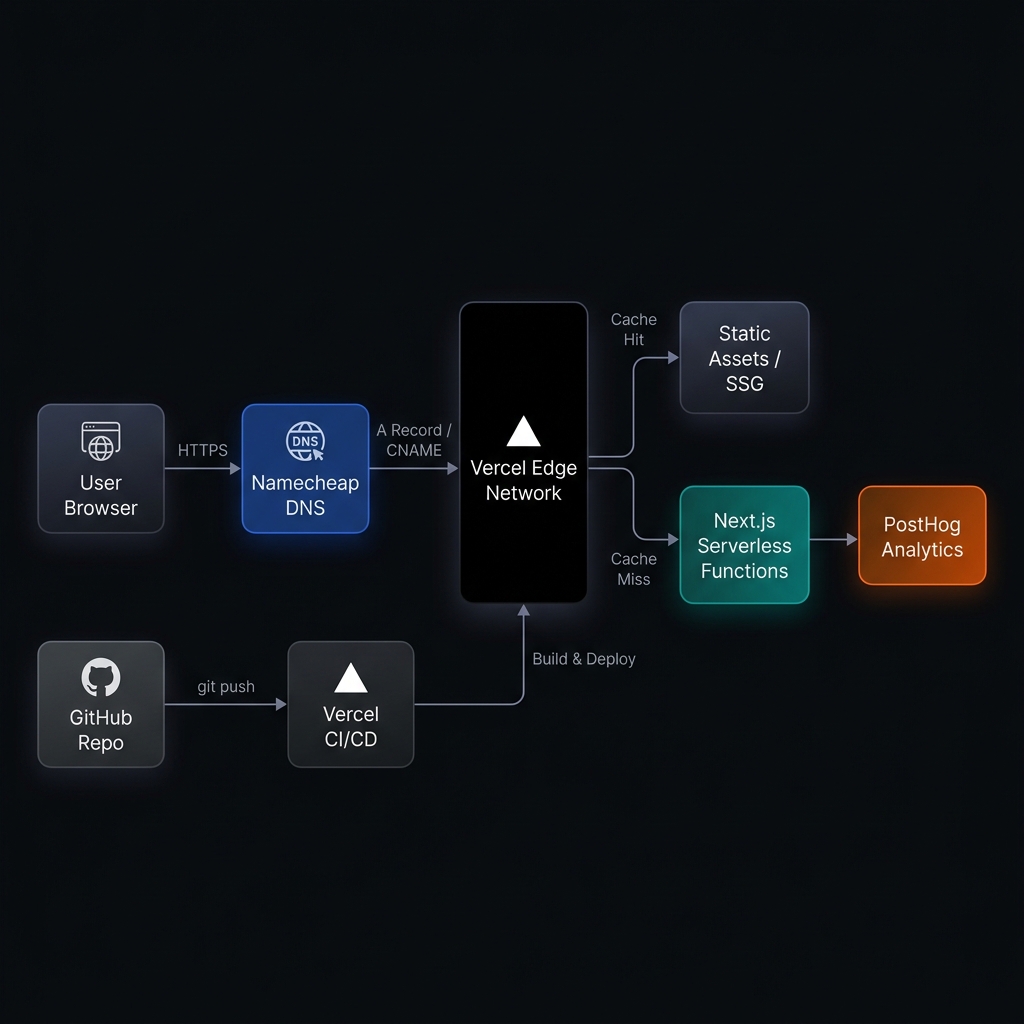
The CDN Dilemma: Why I Excluded Cloudflare
If you look closely at the diagram above, you'll notice something missing: Cloudflare.
In almost all my enterprise deployments, Cloudflare is sitting at the edge acting as the WAF (Web Application Firewall) and primary CDN. So why omit it here?
The Double-Caching Problem: Next.js 16 has an incredibly aggressive internal caching system (the Data Cache, Full Route Cache, Router Cache, etc.). Vercel’s Edge Network is custom-built to deeply understand and invalidate these Next.js caches natively.
If I put Cloudflare in front of Vercel, I would be stacking a CDN on top of a CDN. When I trigger an on-demand ISR (Incremental Static Regeneration) rebuild, Vercel clears its cache instantly. But Cloudflare wouldn't know about it. Visitors would be served stale content until Cloudflare's TTL expired.
In systems engineering, unnecessary abstractions equal technical debt. Vercel provides DDoS protection and global edge routing out of the box. Dropping Cloudflare keeps the architecture lean and eliminates cache invalidation nightmares.
DNS Routing: Getting into the Weeds
To route traffic directly to Vercel without Cloudflare, I managed the DNS explicitly at the registrar level (Namecheap).
Here is the exact zone file configuration running in production right now:
| Type | Host | Value | TTL | Purpose |
|---|---|---|---|---|
| A | @ | 216.198.79.1 | Automatic | Apex domain routing |
| CNAME | www | b572569d81273181.vercel-dns-017.com | 30 min | Subdomain routing (Vercel specific pool) |
Notice the specific vercel-dns-017.com endpoint? Vercel recently migrated away from generic CNAMEs (cname.vercel-dns.com) to project-specific endpoints. This mitigates "dangling DNS" takeover attacks—a common vulnerability where attackers hijack abandoned domains still pointing to generic cloud provider endpoints.
Observability: Moving Beyond Google Analytics
Google Analytics tells you how many people visited. As a systems engineer, I need to know what they experienced. Are there client-side React hydration errors? Is the dark-mode toggle failing on Safari mobile?
I ripped out Google Tag Manager and replaced it with PostHog.
PostHog isn't just an analytics tool; it's an engineering observability platform.
- Session Replays: I can watch a video playback of a user's DOM rendering. If they rage-click a button, I see it.
- Error Tracking: If my GitHub API Token rate-limits and throws a 429 error on the backend, PostHog captures the stack trace.
- Feature Flags: I can roll out new portfolio sections (like a new case study) to 10% of traffic before opening it up globally.
// src/lib/events.ts - How I capture custom interactions
import posthog from "posthog-js"

export const trackEvent = (
  eventName: string,
  properties?: Record<string, any>
) => {
  if (process.env.NODE_ENV === "production") {
    posthog.capture(eventName, properties)
  }
}
Zero-Downtime CI/CD
Because this is connected directly to my private GitHub repository, the deployment pipeline is completely hands-off.
When I push a markdown file (like the one you are reading right now) to the main branch:
- A GitHub webhook triggers the Vercel build container.
- Vercel runs
pnpm build, compiling the MDX, running TypeScript type-checking, and generating static HTML. - Once the build passes, the Vercel Edge Network atomically swaps the traffic router from the old deployment ID to the new deployment ID.
Zero downtime. Zero manual intervention.
The Takeaway
Is this overkill for a static portfolio? Probably.
But infrastructure is a mindset. Whether you are managing a 500-node Kubernetes cluster serving millions of requests a minute, or a single Next.js app serving your resume, the principles remain the same: Automate everything, monitor what matters, and keep the architecture as simple as possible—but no simpler.
Stop fighting your own infrastructure. If your team is struggling with slow CI/CD pipelines, messy cloud architectures, or unexplained downtime, let's fix it. Book a Free Infrastructure Audit.
Get weekly DevOps insights
Join engineers who read my deep-dives on Kubernetes, AWS cost optimization, CI/CD, and infrastructure automation.

DevOps Consultant & Cloud Engineer
I build systems that run reliably, scale efficiently, and deploy intelligently. See how I can help your team.